5/27/2020

Duration vs Period in Java 8

Both classes can be used to represent an amount of time or also measure the difference two dates.
How to use both in different situations?

  • date-based value (Period): check whether days of period is over setting.

    LocalDate localDate = java.time.LocalDate.parse(matcher.group(1), DATE_TIME_FORMATTER);
    long days = Period.between(localDate, java.time.LocalDate.now()).getDays();
    return (days >= 5);
  • time-based value (Duration): check an interval of time in seconds or nanoseconds.

    Duration.between(startTime, LocalTime.now()).getSeconds();

Ref

Java Period and Duration

5/25/2020

Redpill

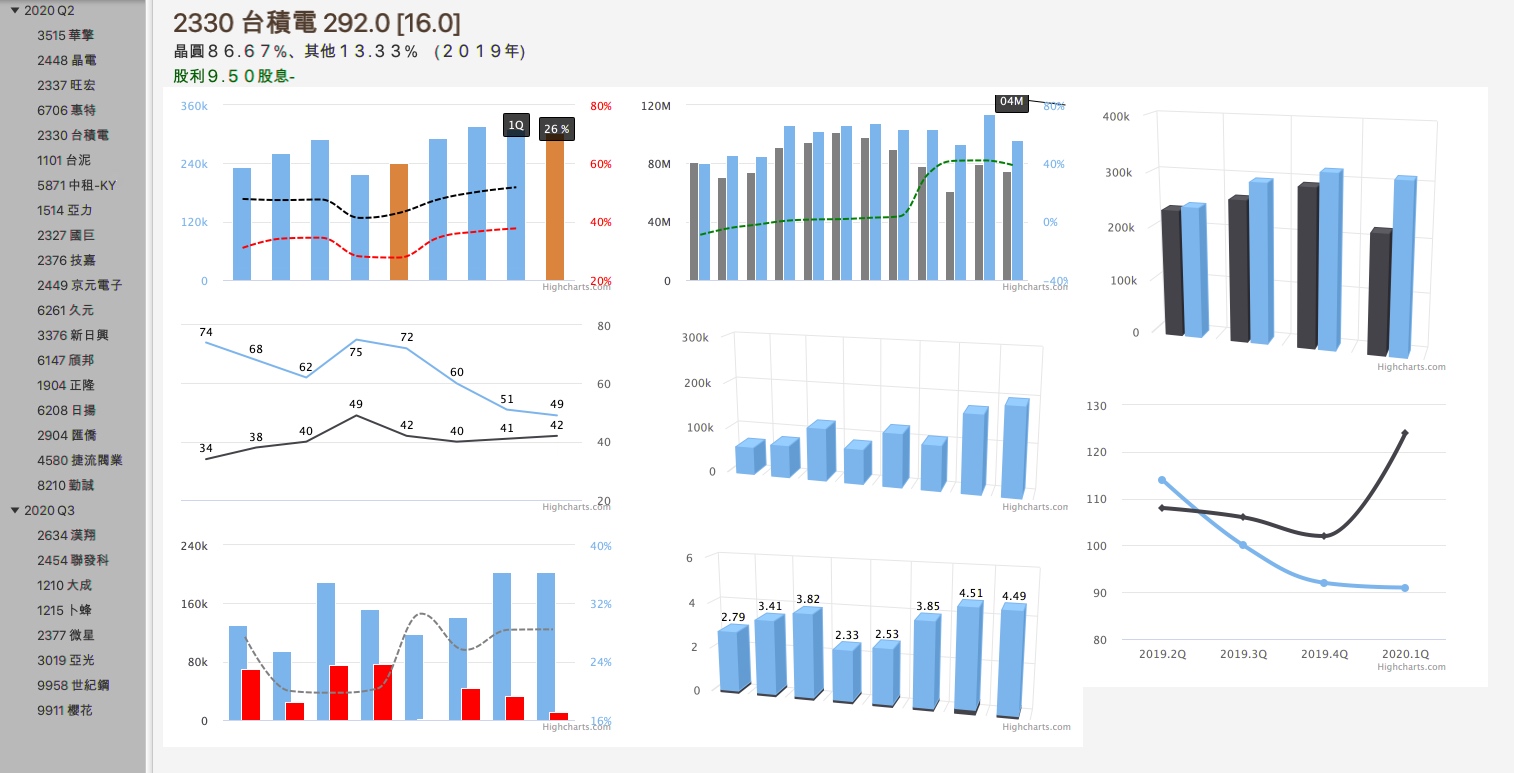
Redpill is a my side project which is used to visualize financial statement analysis is the process of analyzing a company's financial statements for decision-making purpose. For me use it to UNDERSTAND the overall health of an organization as well as to evaluate financial performance and business values.

Here are some technologies that can help build it as below.

  1. JDK 11- Module, JavaFx, HttpClient...
  2. Apache Spark - an unified analytics engine for big data processing, with built-in modules for streaming, SQL, machine learning and graph processing.
  3. Integration of Sprint Boot and JavaFx
  4. Spring-based development.
  5. Based on Hexagonal architecture, Ports and adapters architecture, is an architectural pattern used in software design. It aims at creating loosely coupled application components that can be easily connected to different software environments.

Now it's still a drat version will be updated by new ideas.

1/05/2020

Kafka Topic Partitions

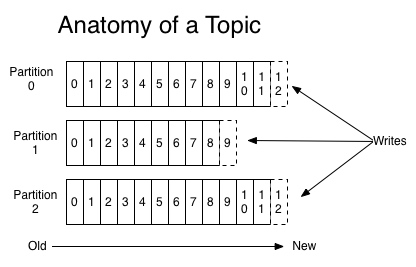
In kafka, A topic is a category/feed name for messages are stored and pushed. Further, Kafka breaks topic logs up into partitions, interesting part here.

From the kafka documentation

Each partition is an ordered, immutable sequence of records that is continually appended to—a structured commit log. The records in the partitions are each assigned a sequential id number called the offset that uniquely identifies each record within the partition.

The partitions in the log serve several purposes. First, they allow the log to scale beyond a size that will fit on a single server. Each individual partition must fit on the servers that host it, but a topic may have many partitions so it can handle an arbitrary amount of data. Second they act as the unit of parallelism—more on that in a bit.

To significantly increase the throughput and performance of handling messages, the multiple partitions be consumed by multiple PODs(instances) should be considered into. Here's using simple kafka commands to simulate this case.

Alter the topic to use two partitions

kafka-topics --alter --zookeeper localhost:2181 --topic alarm --partitions 2

Count partitions in alarm Topic

kafka-topics --describe --zookeeper localhost:2181 --topic alarm

Count current message summary

kafka-run-class kafka.tools.GetOffsetShell --broker-list localhost:9092 --topic alarm

Sending the messages by different keys

kafka-console-producer --broker-list localhost:9092 --topic snmp-trap-alarm  --property "parse.key=true" --property "key.separator=:"
>k1:message1
>k2:message2
>k3:message3
>...

Consumers can assign the specific partition num 0, 1... to handle messages

kafka-console-consumer --bootstrap-server localhost:9092 --from-beginning --topic alarm --property print.key=true --partition 0

kafka-console-consumer --bootstrap-server localhost:9092 --from-beginning --topic alarm --property print.key=true --partition 1

12/20/2019

Configuring Authentication with Kerberos in Kafka

One day R&D team asked by configuring authentication with kerberos to simulate our customer environment and QA be based on this to verify the incoming messages. As we known, Kerberos security for Kafka is optional feature, normal case we don't need to use it in Intranet network or zone.

What's Kerberos

Kerberos is a network authentication protocol. It is designed to provide strong authentication for client/server applications by using secret-key cryptography. A free implementation of this protocol is available from the Massachusetts Institute of Technology. Kerberos is available in many commercial products as well. [ref]

Prerequisite

Kerberos, Kafka and Zookeeper are installed on same host with using same domain. First time don't consider to setup in different hosts with different domain.
A Kerberos realm is the domain over which a Kerberos authentication server has the authority to authenticate a user, host or service.
All hosts must be reachable using hostnames; It is a Kerberos requirement that all your hosts can be resolved with their FQDNs.

Configure

Step 1: Prepare keytab for kafka/client/zookeeper

Using two commands to create principal and export the keytab as file.

sudo /usr/sbin/kadmin.local -q 'addprinc -randkey {principal}/{hostname}@{REALM}'
sudo /usr/sbin/kadmin.local -q "ktadd -k /tmp/keytabs/{keytabname}.keytab kafka/{hostname}@{REALM}"

Kafka

sudo /usr/sbin/kadmin.local -q 'addprinc -randkey kafka/mydomain.com@SUPER_HERO'
sudo /usr/sbin/kadmin.local -q "ktadd -k /tmp/keytabs/kafka.keytab kafka/mydomain.com@SUPER_HERO"

zookeeper

sudo /usr/sbin/kadmin.local -q 'addprinc -randkey zookeeper/mydomain.com@SUPER_HERO'
sudo /usr/sbin/kadmin.local -q "ktadd -k /tmp/keytabs/zookeeper.keytab zookeeper/mydomain.com@SUPER_HERO"

kafka client

sudo /usr/sbin/kadmin.local -q 'addprinc -randkey kafka_client/mydomain.com@SUPER_HERO'
sudo /usr/sbin/kadmin.local -q "ktadd -k /tmp/keytabs/kafka_client.keytab kafka_client/mydomain.com@SUPER_HERO"

Step 2: Kafka and Zookeeper Operation First

Configure server.properties for kafka
vim server.properties

...
#Binding SASL_PLAINTEXT protocol in 9094 port
listeners=PLAINTEXT://localhost:9092,SASL_PLAINTEXT://mydomain.com:9094 
advertised.listeners=PLAINTEXT://localhost:9092,SASL_PLAINTEXT://mydomain.com:9094
listener.security.protocol.map=PLAINTEXT:PLAINTEXT,SSL:SSL,SASL_PLAINTEXT:SASL_PLAINTEXT,SASL_SSL:SASL_SSL

## inner comuncation with SASL_PLAINTEXT
security.protocol=SASL_PLAINTEXT
sasl.mechanism=GSSAPI
sasl.mechanism.inter.broker.protocol=GSSAPI
sasl.kerberos.service.name=kafka
...
zookeeper.connect=mydomain.com:2181
...

Prepare JDK's Kerberos Requirements (/usr/local/etc/kafka/security/krb5.conf)

[libdefaults]
default_realm = SUPER_HERO
forwardable = true
kdc_timeout = 3000
ns_lookup_kdc = false
dns_lookup_realm = false
[realms]
SUPER_HERO = {
  kdc = mydomain.com
  admin_server = mydomain.com
}
[domain_realm]
.mydomain.com = SUPER_HERO
mydomain.com = SUPER_HERO

Step 2.1: Startup Zookeeper

Prepare Zookeeper's Jaas file (/usr/local/etc/kafka/security/zookeeper_jaas.conf)

Server {
  com.sun.security.auth.module.Krb5LoginModule required 
  debug=true
  useKeyTab=true
  keyTab="/usr/local/etc/kafka/security/zookeeper.keytab" <--your zookeper keytab path
  storeKey=true
  useTicketCache=false
  principal="zookeeper/mydomain.com@SUPER_HERO";
};

Export KAFKA_HEAP_OPTS for zookeeper process. MUST ENABLE sun.security.krb5.debug MODE, otherwise it's super hard to find the cause.

export KAFKA_HEAP_OPTS="-Djava.security.krb5.conf=/usr/local/etc/kafka/security/krb5.conf -Djava.security.auth.login.config=/usr/local/etc/kafka/security/zookeeper_jaas.conf  -Dsun.security.krb5.debug=true"

start zookeeper process

zookeeper-server-start /usr/local/etc/kafka/zookeeper.properties

Step 2.2: Startup Kafka

Prepare Kafka's Jaas file (/usr/local/etc/kafka/security/kafka_server_jaas.conf)

KafkaServer {
    com.sun.security.auth.module.Krb5LoginModule required
    useKeyTab=true
    storeKey=true
    debug=true
    serviceName="kafka"
    keyTab="/usr/local/etc/kafka/security/kafka.keytab"
    principal="kafka/mydomain.com@SUPER_HERO";
};

Client {
  com.sun.security.auth.module.Krb5LoginModule required
  debug=true
  useKeyTab=true
  storeKey=true
  keyTab="/usr/local/etc/kafka/security/kafka.keytab"
  principal="kafka/mydomain.com@SUPER_HERO";
};

Export KAFKA_HEAP_OPTS for zookeeper process. MUST ENABLE sun.security.krb5.debug MODE, otherwise it's super hard to find the cause.

export KAFKA_HEAP_OPTS="-Djava.security.krb5.conf=/usr/local/etc/kafka/security/krb5.conf -Djava.security.auth.login.config=/usr/local/etc/kafka/security/kafka_server_jaas.conf -Dsun.security.krb5.debug=true"

start kafka process

kafka-server-start /usr/local/etc/kafka/server.properties

EVERYTHING IS FINE, THE KAFKA LOG LOOK LIKE as

Added key: 16version: 2
Added key: 23version: 2
Added key: 18version: 2
Using builtin default etypes for default_tkt_enctypes
default etypes for default_tkt_enctypes: 18 17 16 23.
>>> EType: sun.security.krb5.internal.crypto.Aes256CtsHmacSha1EType
>>> KrbAsReq creating message
>>> KrbKdcReq send: kdc=mydomain.com UDP:88, timeout=3000, number of retries =3, #bytes=281
>>> KDCCommunication: kdc=mydomain.com UDP:88, timeout=3000,Attempt =1, #bytes=281
>>> KrbKdcReq send: #bytes read=815
>>> KdcAccessibility: remove mydomain.com
Looking for keys for: kafka/mydomain.com@SUPER_HERO
Found unsupported keytype (1) for kafka/mydomain.com@SUPER_HERO
Added key: 16version: 2
Added key: 23version: 2
Added key: 18version: 2
>>> EType: sun.security.krb5.internal.crypto.Aes256CtsHmacSha1EType
>>> KrbAsRep cons in KrbAsReq.getReply kafka/mydomain.com
principal is kafka/mydomain.com@SUPER_HERO
Will use keytab
Commit Succeeded

[2019-12-21 12:13:43,633] INFO Successfully logged in. (org.apache.kafka.common.security.authenticator.AbstractLogin)
[2019-12-21 12:13:43,634] INFO [Principal=kafka/mydomain.com@SUPER_HERO]: TGT refresh thread started. (org.apache.kafka.common.security.kerberos.KerberosLogin)

Step 2.3: Kafka Client

Prepare client.properties which tell client to use SASL_PLAINTEXT.

security.protocol=SASL_PLAINTEXT
sasl.kerberos.service.name=kafka
sasl.mechanism=GSSAPI

Prepare Client's Jaas file (/Users/chliu/temp/qa_kafka/jaas.conf)

KafkaClient {
    com.sun.security.auth.module.Krb5LoginModule required
    useKeyTab=true
    storeKey=true
    debug=true
    keyTab="/usr/local/etc/kafka/security/kafka-client.keytab"
    principal="kafka-client/mydomain.com@SUPER_HERO";
};
export KAFKA_OPTS="-Djava.security.auth.login.config=/Users/chliu/temp/qa_kafka/jaas.conf -Djava.security.krb5.conf=/usr/local/etc/kafka/security/krb5.conf -Dsun.security.krb5.debug=true"

Sending message into test topic.

kafka-console-producer  --broker-list mydomain.com:9094 --topic test --producer.config client.properties

10/29/2019

Change log level at runtime for logback

For Ops issues cares a lot about logging to store in elasticsearch, which is impacted to the performance. In past We tried to reduce logging as default and change to debug level, but sometimes devs also need to go to troubleshooting incidents in production. Here is change log level way which doesn't need to rebuild project based on logback jmx feature.

Enable JMX in logback configuration

jmxConfigurator need to be added in logback.

  <jmxConfigurator />
  
  <appender name="console" class="ch.qos.logback.core.ConsoleAppender">
    <layout class="ch.qos.logback.classic.PatternLayout">
      <Pattern>%date [%thread] %-5level %logger{25} - %msg%n</Pattern>
    </layout>
  </appender>

  <root level="debug">
    <appender-ref ref="console" />
  </root>  
</configuration>

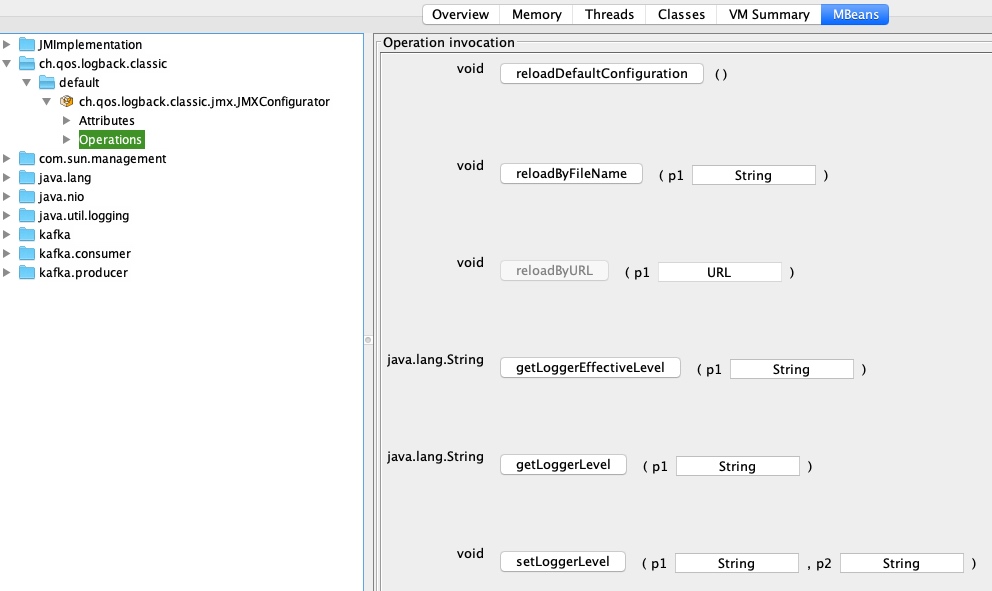
The logback with jmx can be verified by jconsole.

Use jmxterm command line based interactive to access

Welcome to JMX terminal. Type "help" for available commands.
$>open 2767  <--process id
#Connection to 2767 is opened
$>domains
#following domains are available
JMImplementation
ch.qos.logback.classic
com.sun.management
java.lang
java.nio
java.util.logging
kafka
kafka.consumer
kafka.producer
$>domain ch.qos.logback.classic
#domain is set to ch.qos.logback.classic
$>bean ch.qos.logback.classic:Name=default,Type=ch.qos.logback.classic.jmx.JMXConfigurator
#bean is set to ch.qos.logback.classic:Name=default,Type=ch.qos.logback.classic.jmx.JMXConfigurator
$>run setLoggerLevel com.abc.cde.consumer.MessageRequestConsumer DEBUG  
#calling operation setLoggerLevel of mbean ch.qos.logback.classic:Name=default,Type=ch.qos.logback.classic.jmx.JMXConfigurator with params [com.abc.cde.consumer.MessageRequestConsumer, DEBUG]
#operation returns:
null
$>close
#disconnected

jmxterm has been supported silent mode, so we can easily implement a shell script for some special handling as below example.

#!/bin/bash
file=jmxterm-1.0.0-uber.jar
if [ ! -f "$file" ]; then
    wget https://github.com/jiaqi/jmxterm/releases/download/v1.0.0/jmxterm-1.0.0-uber.jar
fi
processId=`jps -lvm | grep Bootstrap | awk '{print $1}'`
echo "Java App processId; $processId ; fm logging level to ;$1"
cat <<EOF > jmxcommands
open $processId
bean ch.qos.logback.classic:Name=default,Type=ch.qos.logback.classic.jmx.JMXConfigurator
run setLoggerLevel com.abc.cdef.Parser $1
close
EOF
java -jar "$file" -n < jmxcommands

References

8/21/2019

[Ref] Data Classes Considered Harmful

In reality, there ain't no such thing as a free lunch, when you used data class as Project Lombok.

Data Classes Considered Harmful

6/03/2019

Linux ate ram as disk cache

One day QA asked why memory was really low in QA linux server. Really not sure, this question is interesting for me, as known, our java applications always configured memory limitation, shouldn't happen low memory issue.

From result of "free -m" command executed and checked, If you just naively look at "used" and "free", you'll think your ram is 98/99% full.

Googling that situation, linuxatemyram, what's going on?
Linux is borrowing unused memory for disk caching. This makes it looks like you are low on memory, but everything is fine. Try to use unused memory as disk caching makes the system much faster and more responsive.

If you deeply read "linux ate ram", don't panic, your ram is fine. ^^!

5/22/2019

httpstat - curl statisticsmade simple

Sometimes need to measure RESTful Api to clarify network and server processing capabilities in customer side. httpstat tool that visualizes curl statistics in a way of beauty and clarity.

macOS install

brew install httpstat

curl statistics

httpstat www.google.com

httpstat site

https://github.com/reorx/httpstat

4/19/2019

Disable encoding URL Using RestTemplate in Spring

The RestTemplate is smart to convert the URL with specific characters to URL encoded. But sometimes, we need to disable URL encoding in order to some specific characters are available on server side as its business requirement.
It's a legacy web service and bad design, but customer don't want to change for some reasons.

Disable Encoding URL

Set encoding encoding mode when initialing rest template.

DefaultUriBuilderFactory defaultUriBuilderFactory = new DefaultUriBuilderFactory();
defaultUriBuilderFactory.setEncodingMode(DefaultUriBuilderFactory.EncodingMode.NONE);
      
RestTemplate restTemplate = new RestTemplate();
restTemplate.setUriTemplateHandler(defaultUriBuilderFactory);

Using other encoding mode to satisfy different integration strategies.

TEMPLATE_AND_VALUES, VALUES_ONLY, URI_COMPONENT, NONE

4/10/2019

3 Type of Timeouts in Http client

There are three type of timeouts in Http Client which could be considered to be adjusted when encountering unreliable destination endpoint.

  1. ConnectionTimeout
    Set the timeout in milliseconds used when requesting a connection from the connection manager.
  2. ConnectionRequestTimeout
    Determines the timeout in milliseconds until a connection is established. A timeout value of zero is interpreted as an infinite timeout.
  3. SocketTimeout
    Determines the socket timeout (SO_TIMEOUT) in milliseconds, which is the timeout for waiting for data or, put differently, a maximum period inactivity between two consecutive data packets).

2/19/2019

Import a SSL certificate into a JVM

Sometimes, it's inevitable that HTTPs is only provided, or you are unable to change third part code to ignore certificate verification.

How to import a certificate into a JVM? Here are some steps.

Step1. Fetch the certificate

openssl s_client -connect youtube.com:443 < /dev/null | sed -ne '/-BEGIN CERTIFICATE-/,/-END CERTIFICATE-/p' > youtube.crt

Step2. Import the certificate

keytool -import -alias youtube.com -keystore /Users/chliu/.sdkman/candidates/java/current/jre/lib/security/cacerts -file youtube.crt
Enter keystore password:<changeit>
Owner: CN=*.google.com, O=Google LLC, L=Mountain View, ST=California, C=US
Issuer: CN=Google Internet Authority G3, O=Google Trust Services, C=US
Serial number: 3b6e50a1d2080062
Valid from: Tue Jan 29 22:58:00 CST 2019 until: Tue Apr 23 22:58:00 CST 2019
Certificate fingerprints:
     MD5:  19:0D:FC:58:69:85:29:59:C4:42:71:05:21:EA:B4:2E
     SHA1: E4:A8:7B:F5:3E:9A:17:4A:E2:9F:26:8F:81:23:78:E3:15:08:85:99
     SHA256: F7:EE:A9:17:44:FD:5D:E8:09:73:4D:97:85:E4:7E:AE:FA:73:6D:6F:31:36:55:0B:07:1B:15:68:D8:81:A3:C8
Signature algorithm name: SHA256withRSA
Subject Public Key Algorithm: 2048-bit RSA key
Version: 3

Extensions:

#1: ObjectId: 1.3.6.1.5.5.7.1.1 Criticality=false
AuthorityInfoAccess [
  [
   accessMethod: caIssuers
   accessLocation: URIName: http://pki.goog/gsr2/GTSGIAG3.crt
,
   accessMethod: ocsp
   accessLocation: URIName: http://ocsp.pki.goog/GTSGIAG3
]
]

#2: ObjectId: 2.5.29.35 Criticality=false
AuthorityKeyIdentifier [
KeyIdentifier [
0000: 77 C2 B8 50 9A 67 76 76   B1 2D C2 86 D0 83 A0 7E  w..P.gvv.-......
0010: A6 7E BA 4B                                        ...K
]
]

#3: ObjectId: 2.5.29.19 Criticality=true
BasicConstraints:[
  CA:false
  PathLen: undefined
]

#4: ObjectId: 2.5.29.31 Criticality=false
CRLDistributionPoints [
  [DistributionPoint:
     [URIName: http://crl.pki.goog/GTSGIAG3.crl]
]]

#5: ObjectId: 2.5.29.32 Criticality=false
CertificatePolicies [
  [CertificatePolicyId: [1.3.6.1.4.1.11129.2.5.3]
[]  ]
  [CertificatePolicyId: [2.23.140.1.2.2]
[]  ]
]

#6: ObjectId: 2.5.29.37 Criticality=false
ExtendedKeyUsages [
  serverAuth
]

#7: ObjectId: 2.5.29.17 Criticality=false
SubjectAlternativeName [
  DNSName: *.google.com
  DNSName: *.android.com
  DNSName: *.appengine.google.com
  DNSName: *.cloud.google.com
  DNSName: *.g.co
  DNSName: *.gcp.gvt2.com
  DNSName: *.ggpht.cn
  DNSName: *.google-analytics.com
  DNSName: *.google.ca
  DNSName: *.google.cl
  DNSName: *.google.co.in
  DNSName: *.google.co.jp
  DNSName: *.google.co.uk
  DNSName: *.google.com.ar
  DNSName: *.google.com.au
  DNSName: *.google.com.br
  DNSName: *.google.com.co
  DNSName: *.google.com.mx
  DNSName: *.google.com.tr
  DNSName: *.google.com.vn
  DNSName: *.google.de
  DNSName: *.google.es
  DNSName: *.google.fr
  DNSName: *.google.hu
  DNSName: *.google.it
  DNSName: *.google.nl
  DNSName: *.google.pl
  DNSName: *.google.pt
  DNSName: *.googleadapis.com
  DNSName: *.googleapis.cn
  DNSName: *.googlecommerce.com
  DNSName: *.googlevideo.com
  DNSName: *.gstatic.cn
  DNSName: *.gstatic.com
  DNSName: *.gstaticcnapps.cn
  DNSName: *.gvt1.com
  DNSName: *.gvt2.com
  DNSName: *.metric.gstatic.com
  DNSName: *.urchin.com
  DNSName: *.url.google.com
  DNSName: *.youtube-nocookie.com
  DNSName: *.youtube.com
  DNSName: *.youtubeeducation.com
  DNSName: *.youtubekids.com
  DNSName: *.yt.be
  DNSName: *.ytimg.com
  DNSName: android.clients.google.com
  DNSName: android.com
  DNSName: developer.android.google.cn
  DNSName: developers.android.google.cn
  DNSName: g.co
  DNSName: ggpht.cn
  DNSName: goo.gl
  DNSName: google-analytics.com
  DNSName: google.com
  DNSName: googlecommerce.com
  DNSName: source.android.google.cn
  DNSName: urchin.com
  DNSName: www.goo.gl
  DNSName: youtu.be
  DNSName: youtube.com
  DNSName: youtubeeducation.com
  DNSName: youtubekids.com
  DNSName: yt.be
]

#8: ObjectId: 2.5.29.14 Criticality=false
SubjectKeyIdentifier [
KeyIdentifier [
0000: BB F4 15 80 EC F0 4E F6   58 5A B1 49 4C 82 12 48  ......N.XZ.IL..H
0010: F9 FB 7E 3B                                        ...;
]
]

Step3. Check certificate in keystore

keytool -list -v -keystore $JAVA_HOME/jre/lib/security/cacerts
keytool -list -v -keystore $JAVA_HOME/jre/lib/security/cacerts | grep youtube

Step4. Specify trust store AND PASSWRD

-Djavax.net.ssl.trustStore=$JAVA_HOME/jre/lib/security/cacerts 
-Djavax.net.ssl.trustStorePassword=changeit 
-Djavax.net.debug=all

If there are some issue that hostname in certificate didn't matched, the steps below can help to confirm the issue.

  • Check the Server’s FQDN and make sure this match with the URL configured on the Certificate.
  • Wildcard certificate cannot support subdomain. The subdomain also need to create a certificate. How to Fix SSL Common Name Mismatch Error

2/14/2019

Ignore Certificate Verification Using RestTemplate

For some reasons, we don't want to verify certificate verification when data transfer has to happen over HTTPS.

How to disable verification using restTemplate in Spring?

  1. Custom trustStrategy that trusts all certs
  2. Implement hostname verification which trusts all host

1/17/2019

Show Java Settings as Default

Java -XshowSettings can show possible category arguments in JVM env.

-XshowSettings:category
Shows settings and continues. Possible category arguments for this option include the following:

all
Shows all categories of settings. This is the default value.

locale
Shows settings related to locale.

properties
Shows settings related to system properties.

vm
Shows the settings of the JVM.

java -XshowSettings:all -version

when executed above command, the usage information for running the Java launcher will also be displayed. It can make maintainer a bit less convenient to see those details.


VM settings:
    Max. Heap Size (Estimated): 3.56G
    Ergonomics Machine Class: server
    Using VM: Java HotSpot(TM) 64-Bit Server VM

Property settings:
    awt.toolkit = sun.lwawt.macosx.LWCToolkit
    file.encoding = UTF-8
    file.encoding.pkg = sun.io
    file.separator = /
    ftp.nonProxyHosts = local|*.local|169.254/16|*.169.254/16
    gopherProxySet = false
    http.nonProxyHosts = local|*.local|169.254/16|*.169.254/16
    java.awt.graphicsenv = sun.awt.CGraphicsEnvironment
    java.awt.printerjob = sun.lwawt.macosx.CPrinterJob
    java.class.path = .
    java.class.version = 52.0
    java.endorsed.dirs = /Library/Java/JavaVirtualMachines/jdk1.8.0_111.jdk/Contents/Home/jre/lib/endorsed
    java.ext.dirs = /Users/chliu/Library/Java/Extensions
        /Library/Java/JavaVirtualMachines/jdk1.8.0_111.jdk/Contents/Home/jre/lib/ext
        /Library/Java/Extensions
        /Network/Library/Java/Extensions
        /System/Library/Java/Extensions
        /usr/lib/java
    java.home = /Library/Java/JavaVirtualMachines/jdk1.8.0_111.jdk/Contents/Home/jre
    java.io.tmpdir = /var/folders/zd/5kbv_wbd6cqbpfrf8w95sfnr0000gn/T/
    java.library.path = /Users/chliu/Library/Java/Extensions
        /Library/Java/Extensions
        /Network/Library/Java/Extensions
        /System/Library/Java/Extensions
        /usr/lib/java
        .
    java.runtime.name = Java(TM) SE Runtime Environment
    java.runtime.version = 1.8.0_111-b14
    java.specification.name = Java Platform API Specification
    java.specification.vendor = Oracle Corporation
    java.specification.version = 1.8
    java.vendor = Oracle Corporation
    java.vendor.url = http://java.oracle.com/
    java.vendor.url.bug = http://bugreport.sun.com/bugreport/
    java.version = 1.8.0_111
    java.vm.info = mixed mode
    java.vm.name = Java HotSpot(TM) 64-Bit Server VM
    java.vm.specification.name = Java Virtual Machine Specification
    java.vm.specification.vendor = Oracle Corporation
    java.vm.specification.version = 1.8
    java.vm.vendor = Oracle Corporation
    java.vm.version = 25.111-b14
    line.separator = \n
    os.arch = x86_64
    os.name = Mac OS X
    os.version = 10.14.2
    path.separator = :
    socksNonProxyHosts = local|*.local|169.254/16|*.169.254/16
    sun.arch.data.model = 64
    sun.boot.class.path = /Library/Java/JavaVirtualMachines/jdk1.8.0_111.jdk/Contents/Home/jre/lib/resources.jar
        /Library/Java/JavaVirtualMachines/jdk1.8.0_111.jdk/Contents/Home/jre/lib/rt.jar
        /Library/Java/JavaVirtualMachines/jdk1.8.0_111.jdk/Contents/Home/jre/lib/sunrsasign.jar
        /Library/Java/JavaVirtualMachines/jdk1.8.0_111.jdk/Contents/Home/jre/lib/jsse.jar
        /Library/Java/JavaVirtualMachines/jdk1.8.0_111.jdk/Contents/Home/jre/lib/jce.jar
        /Library/Java/JavaVirtualMachines/jdk1.8.0_111.jdk/Contents/Home/jre/lib/charsets.jar
        /Library/Java/JavaVirtualMachines/jdk1.8.0_111.jdk/Contents/Home/jre/lib/jfr.jar
        /Library/Java/JavaVirtualMachines/jdk1.8.0_111.jdk/Contents/Home/jre/classes
    sun.boot.library.path = /Library/Java/JavaVirtualMachines/jdk1.8.0_111.jdk/Contents/Home/jre/lib
    sun.cpu.endian = little
    sun.cpu.isalist =
    sun.io.unicode.encoding = UnicodeBig
    sun.java.launcher = SUN_STANDARD
    sun.jnu.encoding = UTF-8
    sun.management.compiler = HotSpot 64-Bit Tiered Compilers
    sun.os.patch.level = unknown
    user.country = US
    user.country.format = TW
    user.dir = /Users/chliu/temp/aa/WEB-INF/lib
    user.home = /Users/chliu
    user.language = en
    user.name = chliu
    user.timezone =

Locale settings:
    default locale = English
    default display locale = English (United States)
    default format locale = English (Taiwan)
    available locales = , ar, ar_AE, ar_BH, ar_DZ, ar_EG, ar_IQ, ar_JO,
        ar_KW, ar_LB, ar_LY, ar_MA, ar_OM, ar_QA, ar_SA, ar_SD,
        ar_SY, ar_TN, ar_YE, be, be_BY, bg, bg_BG, ca,
        ca_ES, cs, cs_CZ, da, da_DK, de, de_AT, de_CH,
        de_DE, de_GR, de_LU, el, el_CY, el_GR, en, en_AU,
        en_CA, en_GB, en_IE, en_IN, en_MT, en_NZ, en_PH, en_SG,
        en_US, en_ZA, es, es_AR, es_BO, es_CL, es_CO, es_CR,
        es_CU, es_DO, es_EC, es_ES, es_GT, es_HN, es_MX, es_NI,
        es_PA, es_PE, es_PR, es_PY, es_SV, es_US, es_UY, es_VE,
        et, et_EE, fi, fi_FI, fr, fr_BE, fr_CA, fr_CH,
        fr_FR, fr_LU, ga, ga_IE, hi, hi_IN, hr, hr_HR,
        hu, hu_HU, in, in_ID, is, is_IS, it, it_CH,
        it_IT, iw, iw_IL, ja, ja_JP, ja_JP_JP_#u-ca-japanese, ko, ko_KR,
        lt, lt_LT, lv, lv_LV, mk, mk_MK, ms, ms_MY,
        mt, mt_MT, nl, nl_BE, nl_NL, no, no_NO, no_NO_NY,
        pl, pl_PL, pt, pt_BR, pt_PT, ro, ro_RO, ru,
        ru_RU, sk, sk_SK, sl, sl_SI, sq, sq_AL, sr,
        sr_BA, sr_BA_#Latn, sr_CS, sr_ME, sr_ME_#Latn, sr_RS, sr_RS_#Latn, sr__#Latn,
        sv, sv_SE, th, th_TH, th_TH_TH_#u-nu-thai, tr, tr_TR, uk,
        uk_UA, vi, vi_VN, zh, zh_CN, zh_HK, zh_SG, zh_TW

java version "1.8.0_111"
Java(TM) SE Runtime Environment (build 1.8.0_111-b14)
Java HotSpot(TM) 64-Bit Server VM (build 25.111-b14, mixed mode)

1/13/2019

[Java8] Method References

Method references are the special form of Lambda expression. Sometimes, however, a lambda expression does nothing but call an existing method. In those cases, this way is often clearer to refer to existing method by name. They are more compact and easy-to-ready to express something.

Basically, this is just shorthand syntax for a Lambda Expression but this version is more concise & readable.

Types of Method reference

There are four types of method reference.

Reference to a static method

  @Test
   public void testReferenceStaticMethod()
   {
      Function<String, String> upperFunc = StringUtils::toUpperCase;
      Assert.assertEquals("HI JAVA", upperFunc.apply("hi Java"));
   }

Reference to an instance method of a particular object

    @Test
   public void testInstanceMethod()
   {
      String text = "hi java";
      Supplier<Integer> getLength = text::length;
      Assert.assertEquals(Integer.valueOf(7), getLength.get());
   }

Reference to an instance method of a particular type

    @Test
   public void testInstanceMethodByType()
   {
      Function<String, String> upperFunc = String::toLowerCase;
      Assert.assertEquals("hi java", upperFunc.apply("hi Java"));
   }

Reference to a constructor

    @Test
    public void testCallConstructor()
   {
      Function<Integer, Integer> f = Integer::new;
      Assert.assertEquals(new Integer(99), f.apply(99));
   }

Conclusion

In conclusion, if possible, we should try to use method references can make our code cleaner, more readable & promote code reusability, but they have some restrictions on some cases.

1/07/2019

[Java8] the compiled bytecode of lambda

What's byecode of lambda be generated in Java is interesting for me. From below simple code, we can execute javap to get the compiled asm code which will be performed by JVM.

{
   private Function<String, Integer> f = s -> Integer.parseInt(s);
   public String test()
   {
      Function<String, String> c = (a) -> a.toUpperCase();
      Supplier<Date> s = () -> new Date();
      return c.apply("java") + s.get() + f.apply("99");
   }
}

javap -c -p LambdaBytecode.class

public class org.javasafari.lambda.LambdaBytecode {
  private java.util.function.Function<java.lang.String, java.lang.Integer> f;

  public org.javasafari.lambda.LambdaBytecode();
    Code:
       0: aload_0
       1: invokespecial #1                  // Method java/lang/Object."<init>":()V
       4: aload_0
       5: invokedynamic #2,  0              // InvokeDynamic #0:apply:()Ljava/util/function/Function;
      10: putfield      #3                  // Field f:Ljava/util/function/Function;
      13: return

  public java.lang.String test();
    Code:
       0: invokedynamic #4,  0              // InvokeDynamic #1:apply:()Ljava/util/function/Function;
       5: astore_1
       6: invokedynamic #5,  0              // InvokeDynamic #2:get:()Ljava/util/function/Supplier;
      11: astore_2
      12: new           #6                  // class java/lang/StringBuilder
      15: dup
      16: invokespecial #7                  // Method java/lang/StringBuilder."<init>":()V
      19: aload_1
      20: ldc           #8                  // String java
      22: invokeinterface #9,  2            // InterfaceMethod java/util/function/Function.apply:(Ljava/lang/Object;)Ljava/lang/Object;
      27: checkcast     #10                 // class java/lang/String
      30: invokevirtual #11                 // Method java/lang/StringBuilder.append:(Ljava/lang/String;)Ljava/lang/StringBuilder;
      33: aload_2
      34: invokeinterface #12,  1           // InterfaceMethod java/util/function/Supplier.get:()Ljava/lang/Object;
      39: invokevirtual #13                 // Method java/lang/StringBuilder.append:(Ljava/lang/Object;)Ljava/lang/StringBuilder;
      42: aload_0
      43: getfield      #3                  // Field f:Ljava/util/function/Function;
      46: ldc           #14                 // String 99
      48: invokeinterface #9,  2            // InterfaceMethod java/util/function/Function.apply:(Ljava/lang/Object;)Ljava/lang/Object;
      53: invokevirtual #13                 // Method java/lang/StringBuilder.append:(Ljava/lang/Object;)Ljava/lang/StringBuilder;
      56: invokevirtual #15                 // Method java/lang/StringBuilder.toString:()Ljava/lang/String;
      59: areturn

  private static java.util.Date lambda$test$2();
    Code:
       0: new           #16                 // class java/util/Date
       3: dup
       4: invokespecial #17                 // Method java/util/Date."<init>":()V
       7: areturn

  private static java.lang.String lambda$test$1(java.lang.String);
    Code:
       0: aload_0
       1: invokevirtual #18                 // Method java/lang/String.toUpperCase:()Ljava/lang/String;
       4: areturn

  private static java.lang.Integer lambda$new$0(java.lang.String);
    Code:
       0: aload_0
       1: invokestatic  #19                 // Method java/lang/Integer.parseInt:(Ljava/lang/String;)I
       4: invokestatic  #20                 // Method java/lang/Integer.valueOf:(I)Ljava/lang/Integer;
       7: areturn
}

Lambdas and invokedynamic

The translation of a lambda expression to be bytecode will be performed in below steps.

  • Generate an invokedynamic call site (lambda factory), which when invoked returns an instance of the Functional Interface defined.
  • Create a static method which included the lambda expression will be invoked through the invokedynamic instruction.

If you want to know how invokedynamic works, "Using Invoke Dynamic to Teach the JVM a New Language" is good for us.

12/27/2018

[Java8] Lambda Expression

From Wikipedia, the free encyclopedia

In computer programming, an anonymous function (function literal, lambda abstraction, or lambda expression) is a function definition that is not bound to an identifier. Anonymous functions are often arguments being passed to higher-order functions, or used for constructing the result of a higher-order function that needs to return a function.[1] If the function is only used once, or a limited number of times, an anonymous function may be syntactically lighter than using a named function. Anonymous functions are ubiquitous in functional programming languages and other languages with first-class functions, where they fulfill the same role for the function type as literals do for other data types.

What's a lambda expression in Java world?
A lambda expression is an unnamed block of code with a list of formal parameters and a body, or named an anonymous function.
It can be easily imagined with 3 parts: arguments list, arrow token and body. Let's see more examples.

() -> {}                // No parameters; result is void
() -> 42                // No parameters, expression body
() -> null              // No parameters, expression body
() -> { return 42; }    // No parameters, block body with return
() -> { System.gc(); }  // No parameters, void block body
() -> {                 // Complex block body with returns
  if (true) return 12;
  else {
    int result = 15;
    for (int i = 1; i < 10; i++)
      result *= i;
    return result;
} }
(int x) -> x+1              // Single declared-type parameter
(int x) -> { return x+1; }  // Single declared-type parameter
(x) -> x+1
x -> x+1
(String s) -> s.length()
(Thread t) -> { t.start(); }  // Single declared-type parameter
s -> s.length()               // Single inferred-type parameter
t -> { t.start(); }           // Single inferred-type parameter

(int x, int y) -> x+y  // Multiple declared-type parameters
(x, y) -> x+y          // Multiple inferred-type parameters
(x, int y) -> x+y    // Illegal: can't mix inferred and declared types
(x, final y) -> x+y  // Illegal: no modifiers with inferred types

Basically, we should use inferred-type parameters and simple statement as body while writing code.

12/22/2018

[Java8] Map with Mew Default Methods

Java 8 introduced the new default methods to Map interface which stores lazied-computed value and doesn't break map contract. We can be based on below to write clean code.

getOrDefault

Returns the value to which the specified key is mapped, or defaultValue if this map contains no mapping for the key.

   public void testGetOfDefault()
   {
      Map<String, Integer> studentGrades = new HashMap<>();
      Assert.assertThat(studentGrades.getOrDefault("Chris", 0), equalTo(new Integer(0)));
   }

forEach

Performs the give action for each entry in this map util all entries have been processed or the action throws an exception.

   public void testForEach()
   {
      Map<String, Integer> collector = new HashMap()
      { { put("A", 99); put("B", 80); put("C", 70); } };
      collector.forEach((key, value) -> System.out.println(String.format("%s => %s", key, value)));
   }

replaceAll

Replaces each entry's value with the result of invoking the given function on that entry util all entries have been processed or the function throws an exception.

   public void testReplaceAll()
   {
      Map<String, Integer> collector = new HashMap()
      { { put("A", 99); put("B", 82); put("C", 71); } };
      collector.replaceAll((key, value) -> value < 90 ? value + 10 : value);
      assertThat(collector, hasEntry("A", 99));
      assertThat(collector, hasEntry("B", 92));
      assertThat(collector, hasEntry("C", 81));
   }

putIfAbsent

If the specified key is not already associated with a value is mapped to null associates if with the given value and return null, else returns the current value.

   public void testPutIfAbsent()
   {
      Map<String, Integer> counters = new HashMap()
      {{ put("c0", 0); }};

      counters.putIfAbsent("c0", 99);
      counters.putIfAbsent("c1", 99);
      
      assertEquals(Integer.valueOf(0), counters.get("c0"));
      assertEquals(Integer.valueOf(99), counters.get("c1"));
   }

computeIfAbsent

If the specified key is not already associated with a value, attempts too compute its value using the given function and enters it into this map unless null.

   public void testComputeIfAbsent()
   {
      Map<String, List<Integer>> counters = new HashMap<>();
      counters.computeIfAbsent("key", k -> new ArrayList<>()).addAll(Arrays.asList(1, 3, 5));
      Assert.assertThat(counters.get("key"), hasItems(1, 3, 5));
   }

computeIfPresent

If the value for the specified key is present and not-null, attempts to compute a new mapping given the key and its current mapped value.

   public void testComputeIfPresent()
   {
      Map<String, Integer> map = new HashMap()
      {{
         put("key", 2);
      }};
      map.computeIfPresent("key", (k, v) -> v / 2);
      assertThat(map.get("key"), equalTo(1));
   }

merge

If the value for the specified key is present and non-null, attempts to compute a new mapping give the key and its current mapped value.

   public void testMergeValue()
   {
      Map<String, String> holder = new HashMap();
      holder.put("chris", "^^~");
      holder.merge("chris", "Java", (v1, v2) -> v1.concat(v2));
      Assert.assertThat(holder.get("chris"), is("^^~Java"));
   }
   

12/14/2018

[Java8] Optional

Java 8 SE introduces a new class called Optional that is inspired from Haskell and Scala. It's a class that encapsulates an option value. We can view Optional as a single value that either contains a value or not.

From Java definition

A container object which may or may not contain a non-null value. If a value is present, isPresent() will return true and get() will return the value.

Here are some test cases.

Creates the non-null and null value optional.

  @Test
   public void testCreate_NonNull_null_Optionals()
   {
      Optional<String> country = Optional.of("Taiwan");
      Assertions.assertTrue(country.isPresent());
      Assertions.assertEquals("Taiwan", country.get());

      Assertions.assertEquals(false, Optional.ofNullable(null).isPresent());
      Assertions.assertEquals("defaultValue", Optional.ofNullable(null).orElse("defaultValue"));
   }

Return value if present, otherwise return other.

   @Test
   public void testGetElseOption()
   {
      Optional<Date> current = Optional.ofNullable(null);
      Assertions.assertNotNull(current.orElse(new Date()));
   }
   

Return the value if present, otherwise invoke other and return the result of that invocation.

   @Test
   public void testOrElseGet()
   {
      Date dateNow = null;
Assertions.assertNotNull(Optional.ofNullable(dateNow).orElseGet(Date::new));
   }

Return the contained value, if present, otherwise throw an exception to be created by the provided supplier.

   @Test
   public void testOrElseThrow()
   {
      Date dateNow = null;
      Assertions.assertThrows(IllegalArgumentException.class, 
         () -> Optional.ofNullable(dateNow).orElseThrow(IllegalArgumentException::new));
   }

If a value is present, and the value matches the given predicate, return a describing the value, otherwise return an empty.

   @Test
   public void testFilter()
   {
      Optional<String> taipeiCity = Optional.of("Taipei").filter((v) -> v.contains("No.1 City"));
      Assertions.assertEquals(Optional.empty(), taipeiCity);

      Optional<String> county = Optional.of("Taiwan").filter(v -> v.contains("Taiwan"));
      Assertions.assertEquals("Taiwan", county.get());
   }

If a value is present, apply the provided {@code Optional}-bearing mapping function to it, return that result, otherwise return an empty {@code Optional}

   @Test
   public void testFlatMap()
   {
      Optional<Integer> numOp = Optional.of("111").flatMap(v -> Optional.of(Integer.valueOf(v)));
      Assertions.assertEquals(Integer.valueOf(111), numOp.get());
   }

In Java8 Optional is often be misused, optionals are not as easy as they seem. This tutorial will help us to avoid doing stupid code.

26 Reasons Why Using Optional Correctly Is Not Optional

12/12/2018

[Java8] BiFunction Functional Interface

From Wikipedia about Arity,

In logic, mathematics, and computer science, the arity /ˈærɪti/ (About this soundlisten) of a function or operation is the number of arguments or operands that the function takes

A binary function takes two arguments.
Example: {f(x,y)=2xy}

From Java definition

Represents a function that accepts two arguments and produces a result. This is the two arity specialization of Function.

here are some test cases to understand deeply biFunction.

   public void testFindEvenNumbers()
   {

      //given
      BiFunction<List<Integer>, Predicate<Integer>, List<Integer>> evenFinder = (list, even) -> {
         return list.stream().filter(even).collect(Collectors.toList());
      };

      //when
      List<Integer> evenNumList = evenFinder.apply(
         Arrays.asList(1, 2, 3, 4, 5, 6, 7, 8),
         (num) -> num % 2 == 0
      );

      //verify
      MatcherAssert.assertThat(evenNumList, hasItems(2, 4, 6, 8));
   }

12/11/2018

[Java8] UnaryOperator Functional Interface

Unary operators need only one operand to perform the task or operation.

From Java definition

Represents an operation on single operand that produces a result of the same type as its operand. This is a specialization of Function for the case where the operand the result are of the same type.

Here are some test cases.

   @Test
   public void testUnaryOperator()
   {
      //when
      UnaryOperator<Integer> increment = (n) -> ++n;
      //verify
      Assertions.assertEquals(Integer.valueOf(2), increment.apply(1));

   }